Slots
Slots  Live
Live  Promotions
FoxSlots App: Download and Install for Android and iOS Devices
Install in seconds. No app store needed.
- Open the site
- Add to Home Screen
- Play
18+ only. Bonus terms apply.

The FoxSlots application is your gateway to more than 8,000 slots, live games and crash titles. The app comes in the form of a PWA you can install on either your mobile device or your PC. A PWA is the website saved as an app, so it updates itself every time you open it and takes up far less space than a store app. It uses the same account, balance and cashier as the site, so there’s nothing to move over.
Is there a FoxSlots Casino App in the Official Stores?
No. Searching for FoxSlots Casino in the App Store or Google Play won’t return a result, and that’s expected rather than a sign of a missing or broken listing. FoxSlots operates as a PWA, browser-based application added to a device’s home screen rather than downloaded through an app store. Once installed, it opens and behaves like a standalone app, complete with its own icon and full-screen interface, without ever having gone through app store review.
PWA vs. Native App: What Actually Changes
The PWA format shifts a few practical things compared to how a typical casino app works, and some of the differences cut in the player’s favor.
| Factor | FoxSlots PWA | Typical native app |
|---|---|---|
| How to get it | Added directly from the browser | Downloaded from Google Play or the App Store |
| Install size | Loads on demand, minimal storage upfront | Often 100MB+ before first use |
| Updates | Apply automatically in the background | Require a manual update through the app store |
| Storage impact | Uses browser cache, easy to clear | Takes up dedicated device storage permanently |
| New feature rollout | Not gated by app store gambling review, so features and promotions can go live sooner | Often delayed by app store gambling policies |
| Offline access | Requires an active connection | Some native apps allow limited offline browsing |
| Interface | Identical to the desktop site | Usually a separate build, sometimes with fewer features |
| Account and bonus access | Same login, same VIP tier, same tournament standing as desktop | Depends on the operator’s app build |
The trade-off worth knowing before installing: there’s no offline mode, so a stable connection is needed every time. Everything else like bonus access, tournaments, VIP perks, deposits and withdrawals carries over exactly as it works on desktop.
How to Install FoxSlots Android and FoxSlots iOS
The installed FoxSlots Casino app opens the same lobby as the website: more than 8,000 games, demo mode without sign-up and deposits from $/€20. These are the installation steps:
- Open the FoxSlots site in your phone or tablet’s browser.
- Add it to your home screen. On Android, tap the three-dot menu in the browser and select “Add to Home Screen.” On iOS, tap the Share button, then “Add to Home Screen,” then confirm with Add.
- Open the app icon from your home screen and sign in to your account.
To make the process easier, you can just tap on the “Download App” button right on the website. It’s clearly visible in the sidebar. The same installation flow works on a desktop.
Since a PWA installs straight from the website, it has no app store page. If you see an app or an APK called FoxSlots in a store or on another site, it isn’t this one, so only install from the official FoxSlots address.
Supported Devices
The FoxSlots app works on any phone or tablet capable of running a modern mobile browser. Recent iPhones, Samsung Galaxy devices and other current Android hardware are all supported, along with tablets like the iPad and Samsung Galaxy Tab. There’s no separate tablet-specific build; the same PWA scales to the larger screen automatically.
Because a PWA runs on your browser’s engine, the browser version matters more than the phone model, so keeping Chrome on Android or Safari on iPhone up to date does more than buying a newer device. The same PWA also installs on a Windows or Mac computer through Chrome or Edge, using the same account.
System Requirements for the FoxSlots App
Treat the numbers in the table as guidelines, not hard limits. The app runs in your browser, so a slightly older phone can still work well on a stable connection. Live dealer games are the exception, because they stream video. That makes them the most demanding part of the app and the biggest user of mobile data, so Wi-Fi is the better choice for them if your data plan has a cap.
| Requirement | Minimum | Recommended |
|---|---|---|
| Android OS | Android 7.0 | Android 10.0 or later |
| iOS | iOS 13.0 | iOS 15.0 or later |
| Storage | 200 MB free | 200 MB free (cache and updates) |
| RAM | 2 GB | 4 GB or more |
| Internet speed (slots & tables) | 3 Mbps | 6 Mbps |
| Internet speed (live casino) | 10 Mbps | 25 Mbps |
What Happens below the Minimum Spec
The app will generally still load on a device that falls short of these numbers, but with predictable trade-offs:
- Below the minimum OS version: some newer games or interface elements may fail to load correctly.
- Below 2 GB RAM: expect slower load times and occasional lag switching between games.
- Below 3 Mbps: slots and table games may buffer intermittently; live dealer games are likely to freeze or drop the connection entirely.
Quick Device Check before Installing
- Check your OS version under Settings > About Phone (Android) or Settings > General (iOS).
- Check available storage under Settings > Storage.
- Run a browser speed test if you’re unsure about your connection. Aim for at least 10 Mbps before attempting live dealer games.
Using FoxSlots Application
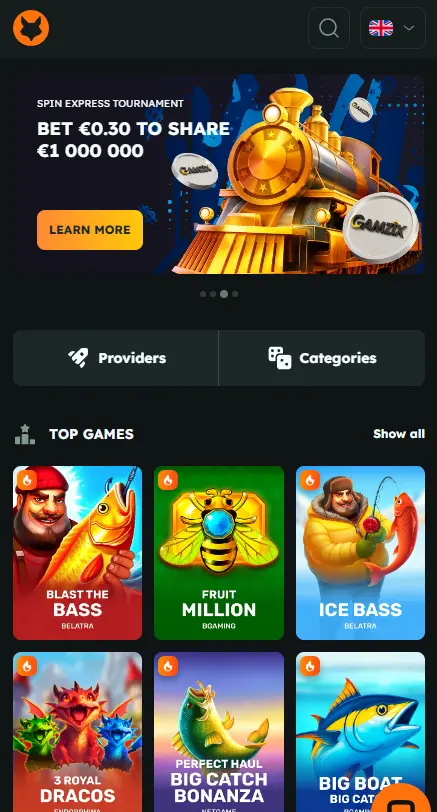
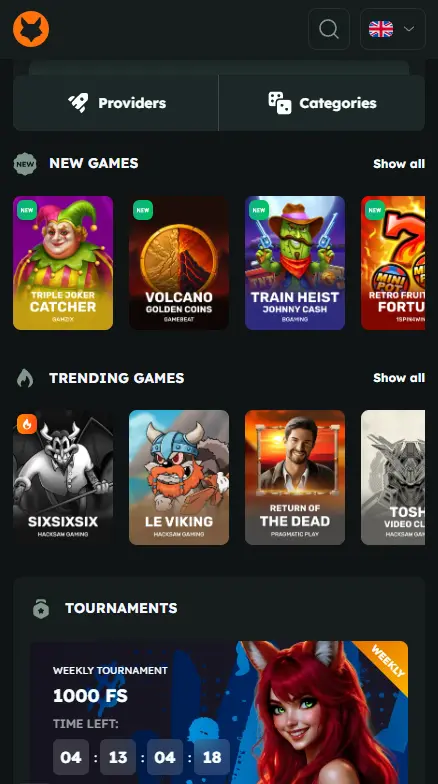
Playing on the FoxSlots mobile app works identically to the desktop platform — sign in, deposit, pick a game, set a bet. The interface uses a dark background with orange and grey accents, and navigation is built around thumb reach: a bottom bar switches between Slots, Live, Promotions and Menu. Scrolling to the bottom surfaces links to Casino, Quick Links, Help and Information. Sign In and Sign Up buttons are the most visible CTA buttons.
One thing that is really convenient is that you have the Top Games section right in front of your eyes when you open the mobile version, and for those who don’t know what to play, it’s definitely a plus.
Security
The app protects data in transit using TLS 1.3 encryption, the current standard for securing login credentials and payment details against interception. Account access sits behind standard login credentials, with an optional two-factor authentication layer available for extra protection, and the platform runs automated fraud detection to flag unusual account activity.
Bonuses for Mobile App Players
Every FoxSlots bonus works identically whether claimed from the app or the desktop site, since both run on the same account. Cashback specifically scales by VIP tier, from 6% at the Sharp Reader level up to 15% for players at the highest loyalty level.
The promos also follow a weekly rhythm, which makes your phone handy for timing a deposit.
- On Friday, FOXFRIDAY gives 55% up to $/€555 plus 55 free spins on Elvis Frog in Vegas.
- On Saturday or Sunday, a $/€20+ deposit with SPINFOX unlocks 50, 75 or 150 free spins on Buffalo Trail.
- On Monday, Foxback Monday returns 10% of your weekly net losses, up to $/€500, once your losses reach $/€100.
There’s also a limited offer: RED45 gives 45 free spins on Red and Hot Chilli with a $/€20+ deposit, available once until October 19.
For the full breakdown of current bonus codes, deposit requirements and wagering terms, see the FoxSlots bonus page.

Final Verdict: FoxSlots App Rating
FAQ
Does FoxSlots have an app for iPhone?
Yes, in the form of a PWA rather than an App Store download. It installs directly from Safari’s Share menu and behaves like a standalone app once added to the home screen.
How much storage does the FoxSlots app need?
About 200 MB free, covering cache and updates. Because it’s a PWA rather than a native install, that figure grows gradually with use rather than being reserved upfront the way a 100MB+ native app download would be.
Can I use FoxSlots on a tablet?
Yes. The same PWA that runs on phones scales to tablets like the iPad or Samsung Galaxy Tab without a separate build. You can install it the same way, through the browser’s Add to Home Screen option.
Is the FoxSlots application safe to use?
Yes, data in transit is protected with TLS 1.3 encryption, and accounts can be secured further with two-factor authentication. The platform also runs automated fraud detection on account activity.